

Your First Modular Java Project with Apache Maven 4

#open-source
#support-and-care
#maven
#java
Apache Maven 4 introduces a new way to structure multi-module Java projects using the module source hierarchy. Instead of spreading your code across multiple Maven modules with separate POMs, you can now define all Java modules in a single POM.
The complete source code is available on GitHub – clone it and follow along!
Managing Complexity in Large Applications
As Java applications grow, managing complexity in terms of class and package dependencies becomes a significant challenge. To keep code maintainable, developers often divide their applications into modules with clear boundaries and responsibilities.
Traditionally, this modularization could hardly be enforced in a monolithic codebase. Developers relied on conventions, package naming schemes, and code reviews to maintain structure. Over time, tools like ArchUnit emerged. It can verify architectural rules at test time and thus enforce the structure at build time.
Modularization by the build system
A more structural approach is to split the codebase into separate Maven subprojects (called modules in Maven 3), each with its own pom.xml.
While this enforces boundaries at build time, it introduces new complexity: managing multiple build units, coordinating internal dependencies, and dealing with the overhead of a multi-module Maven or Gradle reactor build.
Modularization by the language
Java 9 introduced Java Modules
, providing modularization directly at the language level.
With module-info.java descriptors, modules can declare explicit dependencies and control which packages are accessible to other modules.
Terminology:
The official name is Java Platform Module System, but we use the more accessible term Java Modules throughout this series. Some people also refer to it as JPMS, but this was never an official abbreviation and the main author, Mark Reinhold, heavily discourages using it . Java 9 introduced JPMS as part of Project Jigsaw . So you may also find references to Jigsaw in related documents and samples.
The following terms are essential when working with Java Modules:
module
A named, self-describing collection of packages with explicit dependencies and exports.requires
Declares a dependency on another module.exports
Makes a package accessible to other modules.module-info.java
The module descriptor file that defines the module’s name, dependencies, and exports.
Maven 4 to the rescue
Maven 4 combines both approaches perfectly.
With the new module source hierarchy, you can define multiple Java modules within a single Maven project, all sharing one pom.xml.
This gives you the benefits of Java Modules encapsulation without the overhead of managing multiple Maven modules.
Maven 4’s Innovation: Multiple Java Modules in a Single Project:
Both Maven 3 and Gradle support compiling and running Java modules. However, they require each Java module to be a separate build unit – a Maven subproject (called module in Maven 3) or Gradle subproject with its own build configuration. Maven 4 renamed these build units from modules to subprojects to avoid confusion with Java Modules.
Moreover, Maven 4 introduces the module source hierarchy, allowing multiple Java modules to coexist within a single Maven project, sharing one pom.xml.
This eliminates the overhead of managing multiple build files while still benefiting from Java module encapsulation.
This blog article starts a series exploring these new opportunities. We’ll begin with a simple example and progressively add more advanced Java Modules features in later posts.
The Sample Application
Our showcase is a simple Text Analyzer that reads text files and produces statistics like word count, line count, and word frequency. We split the application into two Java modules: a core module containing the domain model and analysis services, and a cli module providing a command-line interface using picocli . Both modules use Log4j 2 for logging, which is itself a fully modular library.
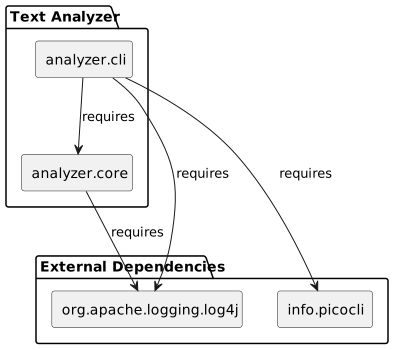
For readability, the diagram uses shortened module names (analyzer.cli, analyzer.core) corresponding to the fully qualified modules com.openelements.showcases.analyzer.cli and com.openelements.showcases.analyzer.core.
The Module Source Hierarchy
With Maven 4’s modelVersion 4.1.0, you can declare multiple Java modules using the <sources> element in just a single pom.xml:
        <sources>
            <source>
                <module>com.openelements.showcases.analyzer.core</module> <!--1-->
            </source>
            <source>
                <module>com.openelements.showcases.analyzer.cli</module> <!--2-->
            </source>
        </sources>
- The core module containing domain model and services
- The CLI module providing the command-line interface
This tells Maven where to find your Java modules. The source code follows a specific directory structure:
src/
├── com.openelements.showcases.analyzer.core/ ①
│   └── main/java/
│       ├── module-info.java
│       └── com/openelements/showcases/analyzer/core/
└── com.openelements.showcases.analyzer.cli/ ②
    └── main/java/
        ├── module-info.java
        └── com/openelements/showcases/analyzer/cli/
- This is the module source directory for the core module
- This is the module source directory for the CLI module
Each Java module contains a module-info.java at the root of its source directory (e.g., src/<module>/main/java/module-info.java).
This file is the module descriptor that defines the module’s name, its dependencies, and which packages it exposes to other modules (cf. Defining Module Dependencies
).
Module Names and Directory Names:
You’ll notice that the module names (e.g., com.openelements.showcases.analyzer.core) match the directory names under src/.
This is a convention that helps keep things organized, but the module name in module-info.java can be different from the directory name if needed.
This may look redundant and cumbersome at first, in particular as we have long module names which duplicate the contained package name hierarchies. For the sake of clarity, we’ll keep them similar at the beginning of this series.
Note that the module name (as well as Java package names) use a dot-separated format, while the directory structure uses slashes (/).
Over time, we may introduce other opportunities to name directories and modules differently.
Defining Module Dependencies
Each Java module needs a module-info.java that declares its dependencies and exports.
Here’s the core module, which currently exports all its packages.
In future blog posts, we will extend this module and demonstrate how to encapsulate implementation details by keeping certain packages internal.
module com.openelements.showcases.analyzer.core {
    requires org.apache.logging.log4j; // ①

    exports com.openelements.showcases.analyzer.core.model; // ②
    exports com.openelements.showcases.analyzer.core.service; // ②
}
- Declare dependency on Log4j for logging
- Export packages that other modules can use
The exports directive makes packages visible to other modules.
Packages not exported are encapsulated – they cannot be accessed from outside the module, even via reflection.
Module Dependencies and Maven Dependencies:
The requires directive in module-info.java declares compile-time and runtime dependencies at the Java module level.
However, you still need to declare these libraries as <dependency> elements in your pom.xml so Maven can download and manage them.
The module system enforces boundaries; Maven provides the artifacts.
Building and Running
Compiling the Modules
Build the project with Maven:
./mvnw compile
After compilation, explore the target/classes directory.
You’ll find that Maven creates a separate output directory for each Java module:
target/classes/
├── com.openelements.showcases.analyzer.core/
│   ├── module-info.class
│   └── com/openelements/showcases/analyzer/core/
│       ├── model/
│       └── service/
└── com.openelements.showcases.analyzer.cli/
    ├── module-info.class
    └── com/openelements/showcases/analyzer/cli/
Each module directory is an exploded module – a directory containing compiled classes along with its module-info.class.
This structure allows the Java runtime to load each module separately from the module path.
External Dependencies
The application depends on Log4j 2 and picocli, which are modular libraries.
For the sake of simplicity, we will copy the dependencies to a target/lib directory.
Copy dependencies to target/lib for the module path:
./mvnw prepare-package
Running the Application
Run the application using the module path:
java --module-path "target/classes:target/lib" \
     --module com.openelements.showcases.analyzer.cli/com.openelements.showcases.analyzer.cli.AnalyzerCommand \
     README.md
- The module path contains:
- The exploded modules from the
target/classes/directory - The external dependencies from the
target/lib/directory (all contained JARs)
- The exploded modules from the
- The main class to run, specified as
<module>/<fully-qualified-class-name> - Input file to analyze
On Windows, you need to use a semicolon (;) instead of a colon (:) to separate paths in the --module-path argument.
IMPORTANT: Module Path Instead of Classpath
Note that we do not specify the classpath anymore when using modules. All dependencies and modules must be available on the module path. This is a fundamental change when working with modular Java applications.
The classpath is a flat list of JARs and directories where Java searches for classes. It provides no encapsulation – any public class can access any other public class.
The module path can contain modular JARs (with module-info.class), exploded module directories, or directories containing modular JARs.
The Java runtime uses module descriptors to enforce boundaries: only exported packages are accessible, and only declared dependencies can be used.
Using the module path leads to a significant improvement in runtime dependency management, as the Java runtime can enforce module boundaries and dependencies at runtime.
Security Benefits
This also brings security benefits.
Java’s original Security Manager and AccessController APIs – designed to sandbox untrusted code – were complex, rarely used correctly, and carried performance overhead.
Java 17 set them to deprecated
and Java 24 removed them entirely
.
Java Modules provide a simpler, more effective security model through strong encapsulation: The runtime truly hides internal packages and prevents all kinds of access even via reflection, unless explicitly opened.
This prevents libraries and frameworks from accessing private implementation details of your code or the JDK itself.
Summary
In this first article, we’ve seen:
- Maven 4’s module source hierarchy with
<sources>element - Basic
module-info.javawithrequiresandexports - Building and running modular applications
Homework
- Check the expected output
If you look into the source code and the dependencies and execute the application, you might notice some missing output. If you take a close look at the Maven output and the resulting target directory structure, you may find clues on what is missing. - Try to package the modules as JAR and run it
You may try to package the application as a JAR file and run it from there by executing./mvnw package(a JAR file will appear in thetargetfolder). What do you observe when trying to run the JAR file by replacing thetarget/classespath with the JAR file path in the--module-pathargument?
We address both issues in the follow-up homework article .
Apache Maven and Maven are trademarks of the Apache Software Foundation .

Gerd Aschemann
Gerd brings years of intensive experience as a software architect with a strong development and operations background (DevOps). His particular strength lies in guiding his team and the organizations of his clients toward new technologies and approaches, and establishing new methods on a long-term basis.